The Blinking Box in the Hall: A Practical Audit of Your Smart Meter Display
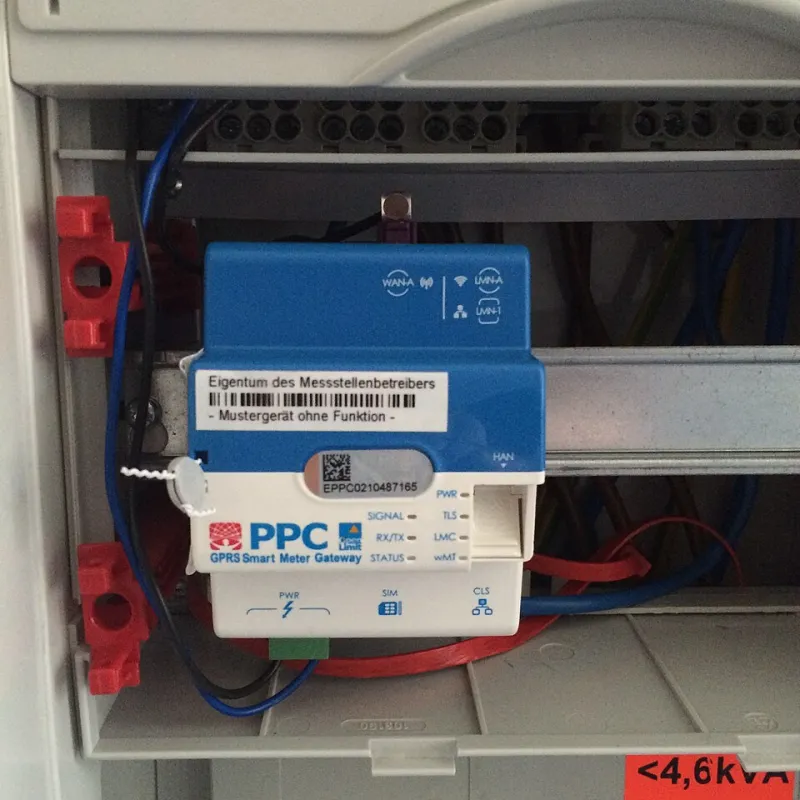
Photo: Pichiciago, CC BY-SA 4.0, via Wikimedia Commons
There is a small screen in many UK hallways that blinks, shows pounds and pence, and gets ignored for months. It is the in-home display for a smart meter, and it is easy to file under boring household admin. That would be a mistake. In 2026, the smart meter is about as normal as a broadband router, and like a router it is a connected piece of kit with settings, data flows and failure modes. You do not need to become an energy analyst. You do need to know what the box is doing, what it shares, and when to stop trusting the number on the screen.
The display is not the meter
The in-home display, usually called an IHD, is the gadget on your shelf. The meter is the thing in the cupboard or outside wall. The meter records your gas and electricity use; the display shows a near-real-time estimate of what you are using and what it costs. It connects to your meter through a home area network, often using Zigbee, and the meter talks to the outside world through a communications hub. That hub does not run on your home Wi-Fi. This matters because when someone says their smart meter is offline, they often mean the display has lost its connection, or the hub cannot reach the national network. The meter may still be recording.
What gets recorded and shared
Electricity smart meters record usage in half-hourly chunks. Gas meters do something similar. The data travels to the national smart metering network and then to your supplier. The question worth asking is not whether data exists, but how often it is shared and what it is used for. Suppliers can collect readings at different frequencies, and you can express a preference about half-hourly, daily or monthly sharing. Some tariffs, especially time-of-use deals, need finer data to work properly. If you are on a standard tariff, you may be comfortable with less frequent sharing. Either way, check the data settings in your supplier account rather than assuming. Look at marketing permissions too. Smart meter data is not just a billing stream. Half-hourly patterns can hint at when the house is empty, when someone is working from home, when the washing machine runs and how late the monitors stay on. That is not a reason to panic. It is a reason to treat the data with the same common sense you apply to any other connected service.
Settings worth checking
Start with the display itself. Is the tariff correct? Is it showing both gas and electricity? Are the units and cost figures making sense? Some displays let you set a budget or a target; useful if you like a nudge, but not a substitute for checking the actual bill. If the screen shows dashes or zero, the display may have lost its pairing with the meter. Moving it closer to the communications hub can help, but thick walls and metal cupboards are not your friends. Do not hide it behind the Christmas cards and expect a reliable signal. On the supplier side, log in and look for data preferences, app access and notification settings. If you have solar panels, an EV charger or a heat pump, ask how import and export are represented. Not every display handles the full picture elegantly, and the screen may show a simple cost figure that does not tell the whole story.
Where smart meters fall short
During a power cut, the display goes blank. That is normal. The meter should retain its data and send it when power and communications return, but you should not rely on the IHD for live outage information. Check your supplier's outage map or call them if you need to. On home-working days, the display measures the whole house, not your laptop. It cannot tell you whether the kettle, the monitor or the tumble dryer is responsible unless you test things one at a time. It can also make you obsessive. A glance before you start work and another before you finish is usually enough. Connectivity is the other weak spot. The communications hub needs a signal, and in some areas that signal is patchy. If readings fail, you can still be billed on estimates. Keep an eye on your account and submit a manual reading if your supplier asks.
A five-minute audit
Find the meter and the communications hub, and note where they are. Check the display is showing both fuels and the right tariff. Log into your supplier account and review data-sharing frequency and marketing permissions. Confirm how you would submit a manual reading if the smart connection dropped for a week. Decide whether the display is in a sensible spot or just the nearest shelf. Finally, if you work from home, treat it as a prompt rather than a policeman. The Element24 view is simple: your smart meter is infrastructure. Audit it once, then get on with your day.
That blinking box is not the most exciting gadget in your home. But it is one of the few that sits at the junction of your bills, your broadband-era home and your personal data. A short check now is more useful than another year of ignoring it.